Many organizations are seeking to come up prominently in searches that relate to the location where they provide much of their service, and video is often a big piece of coming up prominently —video makes you stand out in searches. So it stands to reason that tagging YouTube videos with location information helps your efforts.
Tagging YouTube videos at upload and in the video manager

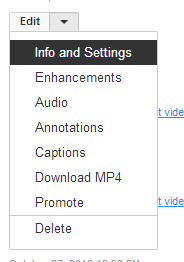
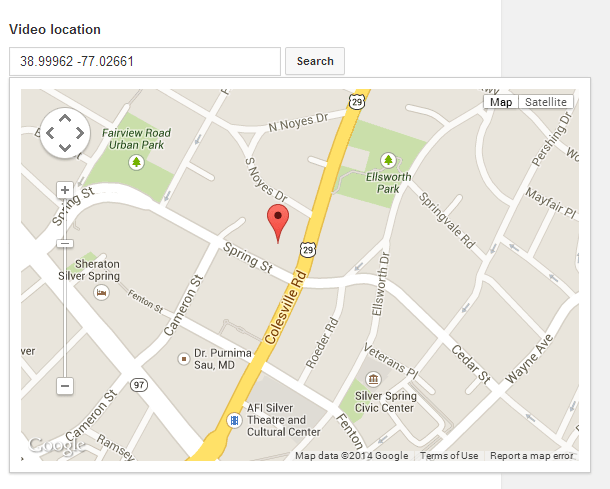
When you upload a video, on the basic settings, you’ll see on the bottom right a box where you can fill in tags. If you want your video to come up on location-related searches, filling in your location and your industry here certainly makes sense. You can also add tags by going through the Video Manager–click the little down arrow next to edit, and choose “Info and Settings.” The “Info and Settings” screen also give you the option to add a video’s location. In addition to the “Basic info” there’s a tab for “Advanced settings,” where you can designate whether viewers can add comments, view ratings, see the statistics, watch it without age restriction, and embed the video elsewhere on the web. It also includes options for licensing, syndication, caption certification, recording date, whether it’s 3D, and the video location.
These functions are not actually searchable. In other words, at this time, adding your video’s location will not increase traffic from people searching for video by your location. The latest version of Google Maps no longer has the “search nearby” feature, which used to produce videos geotagged near a location; this website is kind of fun and preserves that functionality. However, we suspect that YouTube may one day increase this functionality. Thus, if your location is important to your identity, fundraising efforts (think “Washington DC hunger nonprofit” or “Montgomery County MD affordable housing”), it may be simpler to tag YouTube videos now with your location so that the videos on your channel are ready to go when YouTube/Google does more with this feature.
Tagging YouTube videos through the video’s description and transcript
For searching, it’s at least as important that your phrases appear in the video’s description, so make sure that you have key phrases there. An uploaded transcript with the right words will help, too. Here’s a video that has “Washington, DC” three times in its description:
Even as global connectivity increases, at times it’s really important where you are. Videos are a great way to create a sense of place—and gain marketing and fundraising benefit to boot.
If MiniMatters can help you with business video, fundraising video, association video, or other video production needs, we’d love to provide an estimate through our online form, talk with you at 301-339-0339, or communicate via email at videos@minimatters.com. We serve associations, foundations, nonprofits, and businesses primarily in Washington, DC, Maryland, and northern Virginia.